


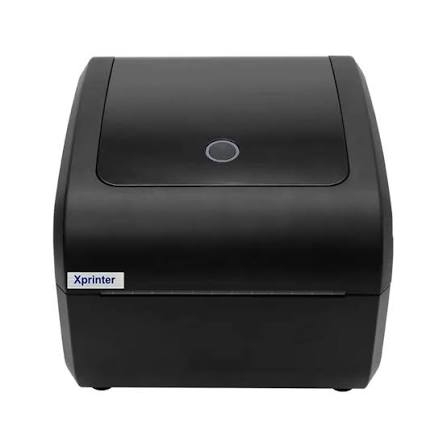
Print speed matters when you need to produce dozens, hundreds, or even thousands of labels during a workday. A slow printer can create unnecessary waiting, especially in shipping, retail, and warehouse environments where labels form part of a larger workflow.
An Xprinter label printer may offer different printing speeds depending on the model and its specifications. The advertised speed gives you a useful starting point, but real-world performance also depends on label size, print density, connection type, software, and other factors.
What Does Label Printer Speed Mean?
Printer speed usually refers to how quickly the device can move the label material through the print mechanism. Manufacturers often express this measurement in millimeters per second, inches per second, or a similar unit.
A higher number generally means the printer can produce labels faster under suitable conditions. However, it does not necessarily mean every print job will finish at that speed.
For example, a simple label containing a short line of text may print faster in practice than a label filled with detailed graphics or dense barcodes.
What Determines Label Printing Speed?
Several factors influence how quickly a label printer completes a job.
Print Resolution
Print resolution affects the amount of detail the printer needs to reproduce. A high-resolution label with small text and detailed graphics may require more processing than a basic text label.
This does not mean higher resolution always makes printing dramatically slower, but the content and selected settings can affect the overall print cycle.
Label Size
The physical dimensions of the label also matter. A longer label requires more media to pass through the printer.
If two labels contain similar information but one label measures twice the length, producing a batch of the longer labels naturally takes more time.
Print Density
Labels with large dark areas, detailed graphics, or closely spaced information require the print mechanism to process more data.
A simple barcode and text label usually presents a different workload from a label covered with images and dense information.
Connection and Data Transfer
The printer needs to receive the print data before producing the label. A busy computer, slow connection, or inefficient software can create delays before printing actually begins.
For this reason, the printer’s mechanical speed does not always equal the total time from clicking “Print” to receiving the finished label.
How Fast Is Fast Enough?
The right printing speed depends on your workload.
A person printing a few product labels each day probably does not need an extremely high-speed model. A warehouse processing hundreds of shipments may benefit much more from faster output.
Think about your average and busiest periods rather than choosing a printer based solely on its maximum advertised speed.
Print Speed for Different Applications
Different labeling tasks place different demands on a printer.
Shipping Labels
Shipping departments often process labels in batches. Faster printing can help when orders need to move quickly from packing to dispatch.
However, the printer also needs to handle the required label dimensions and barcode quality consistently.
Retail Labels
Retail stores may print price tags, inventory labels, or barcode stickers. In many cases, moderate printing speed provides enough output for daily operations.
Warehouse Labels
Warehouses can have much higher printing volumes. Labels may need to accompany incoming stock, storage locations, picking operations, and outgoing shipments.
Here, print speed becomes more important because delays can affect other parts of the workflow.
Product Labels
Manufacturers and sellers may print labels in batches. The ideal speed depends on production volume and whether labels need detailed graphics, barcodes, or variable information.
Does Print Speed Affect Print Quality?
Print speed and print quality can sometimes involve a tradeoff. Depending on the printer and media, increasing speed while maintaining other settings may affect how consistently certain content appears.
Small text, detailed graphics, and barcodes may require settings that prioritize clarity rather than maximum speed.
The best approach is to test your actual label design and adjust speed and print quality together.
How Many Labels Can You Print in a Minute?
There is no single number that applies to every printer or every label.
Suppose a printer moves media at a specified number of inches per second. The actual number of labels produced each minute depends on the length of each label and the time required to process and print the job.
A short label can therefore produce a much higher label count per minute than a long shipping label, even when both use the same printer.
Why Advertised Speed Is Not the Whole Story
Manufacturers normally test printing speed under particular conditions. Your results may differ because of label size, content, settings, connection, software, and other factors.
For example, a printer may reach its maximum rated speed with a simple test pattern, while a real shipping label containing multiple barcodes and graphics takes longer.
This does not make the advertised specification misleading. It simply means you should treat it as a maximum or reference figure rather than a guarantee for every job.
How to Get Consistent Printing Performance
You can take several practical steps to avoid unnecessary delays.
Use compatible label media and keep the printer properly maintained. Make sure the driver and software settings match the actual label dimensions.
Avoid sending unnecessarily large or complicated print files when a simpler format can achieve the same result. Also check your connection if jobs take a long time to reach the printer.
Regular cleaning and correct media loading can help prevent feeding problems that interrupt otherwise fast printing.
Should You Choose the Fastest Model?
Not always.
A very fast printer may cost more than you need to spend if your daily workload remains small. On the other hand, choosing a model that barely meets your current requirements may become frustrating when your printing volume increases.
Consider these factors together:
- Average labels printed per day
- Maximum workload during busy periods
- Label dimensions
- Content complexity
- Required print quality
- Available budget
- Connection and software requirements
This gives you a more realistic idea of the performance you actually need.
Also, find out about How to Maintain a Thermal Receipt Printer for Maximum Performance
Final Thoughts
A label printer’s printing speed depends on more than its advertised specification. Label length, resolution, print density, content, software, and connection can all affect how quickly a finished label comes out.
For occasional printing, moderate speed may be perfectly adequate. Businesses with high-volume shipping, retail, or warehouse operations should pay closer attention to speed and test performance with their actual label designs before making a final choice.


