


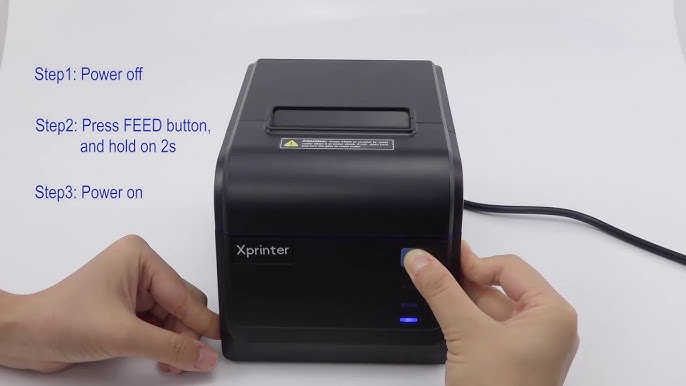
A receipt printer is one of the hardest-working devices in many businesses. From retail stores and restaurants to pharmacies and supermarkets, it handles countless transactions every day. While thermal printers are known for their reliability and low maintenance requirements, regular care is essential to ensure consistent print quality and long-term performance.
Proper maintenance of a Thermal Receipt Printer helps reduce downtime, extend the life of the equipment, and maintain efficient daily operations. By following a few simple maintenance practices, businesses can keep their printers operating at peak performance.
Why Regular Maintenance Matters
Even though thermal printers have fewer moving parts than traditional printers, dust, paper residue, and continuous use can gradually affect their performance.
Routine maintenance helps:
- Extend the printer’s lifespan
- Maintain clear and consistent print quality
- Reduce unexpected downtime
- Prevent paper jams
- Lower repair and maintenance costs
A proactive maintenance routine can help businesses avoid disruptions during busy periods.
Clean the Print Head Regularly
The print head is responsible for producing clear text and images. Over time, residue from thermal paper can build up and reduce print quality.
To clean the print head safely:
- Turn off the printer and unplug it.
- Allow the print head to cool completely.
- Use a lint-free cloth or a thermal printer cleaning pen.
- Gently wipe the print head from one side to the other.
- Allow it to dry before restarting the printer.
Regular cleaning helps maintain sharp receipts and accurate barcode printing.
Use High-Quality Thermal Paper
The quality of thermal paper directly affects printer performance. Low-quality paper often leaves dust and residue inside the printer, increasing wear on the print head.
Using quality thermal paper provides several benefits:
- Better print clarity
- Reduced print head wear
- Fewer paper jams
- Longer printer lifespan
Choosing compatible supplies is a simple way to improve reliability.
Keep the Printer Clean
Dust and debris can accumulate inside the printer over time, especially in busy environments.
Areas that should be cleaned include:
- Paper compartment
- Paper path
- Exterior surfaces
- Paper rollers
Use a soft, dry cloth for routine cleaning and avoid abrasive materials that could damage the printer.
Inspect the Paper Rollers
Paper rollers move the receipt paper smoothly through the printer. Dirty or worn rollers can lead to feeding problems and paper jams.
During inspections, check for:
- Dust buildup
- Cracks or damage
- Flat spots
- Reduced grip
Cleaning or replacing worn rollers helps maintain smooth operation.
Store Thermal Paper Properly
Thermal paper should be stored in appropriate conditions to preserve its quality.
For best results:
- Store paper in a cool, dry location.
- Keep it away from direct sunlight.
- Avoid excessive heat and humidity.
- Leave unused rolls in their original packaging.
Proper storage helps prevent faded receipts and paper damage.
Avoid Exceeding the Recommended Workload
Every printer is designed for a specific daily print volume. Operating beyond the recommended capacity may increase wear on internal components.
To maximize performance:
- Follow the manufacturer’s workload recommendations.
- Allow brief pauses during extremely heavy printing sessions.
- Use the correct paper size and specifications.
Using the printer within its intended limits helps extend its service life.
Check Cables and Connections
Reliable connections are essential for uninterrupted printing.
Regularly inspect:
- Power cables
- USB connections
- Ethernet cables
- Network connections
- Bluetooth settings, if applicable
Loose or damaged cables can cause communication issues and interrupt business operations.
Update Firmware and Drivers
Keeping your printer’s firmware and drivers up to date can improve compatibility, performance, and stability.
Benefits of regular updates include:
- Better software compatibility
- Performance improvements
- Bug fixes
- Increased reliability
Checking for updates periodically helps ensure optimal printer performance.
Perform Routine Test Prints
Printing a test receipt every so often allows you to identify potential problems before they affect daily operations.
Look for:
- Clear text
- Sharp barcodes
- Proper alignment
- Even print density
If the test print shows any issues, clean the printer and inspect the paper before continuing normal use.
Train Staff on Proper Operation
Incorrect handling can shorten the lifespan of a receipt printer. Employees should know how to operate and maintain the equipment correctly.
Basic training should include:
- Loading paper properly
- Replacing paper rolls safely
- Cleaning the printer correctly
- Identifying warning indicators
- Reporting unusual printer behavior
Well-trained staff help reduce avoidable maintenance issues.
Create a Maintenance Schedule
A regular maintenance schedule keeps the printer in excellent working condition.
A simple schedule might include:
- Daily: Check paper levels and wipe away visible dust.
- Weekly: Clean the exterior and inspect paper loading.
- Monthly: Clean the print head and paper rollers.
- Quarterly: Check cables, firmware, and overall printer condition.
Consistent maintenance prevents small problems from becoming major repairs.
Common Maintenance Mistakes to Avoid
Avoid these common practices that can reduce printer performance:
- Using low-quality thermal paper
- Ignoring faded or unclear prints
- Cleaning with harsh chemicals
- Skipping routine inspections
- Exceeding the recommended daily print volume
Preventing these mistakes helps maintain reliable performance over time.
Conclusion
Regular maintenance is one of the most effective ways to keep a thermal receipt printer operating efficiently. Cleaning the print head, using high-quality thermal paper, inspecting rollers, updating firmware, and following a routine maintenance schedule all contribute to better performance and a longer equipment lifespan.
By investing a small amount of time in preventive maintenance, businesses can reduce downtime, maintain excellent print quality, and ensure their thermal receipt printer continues to support fast and reliable daily operations for years to come.


