


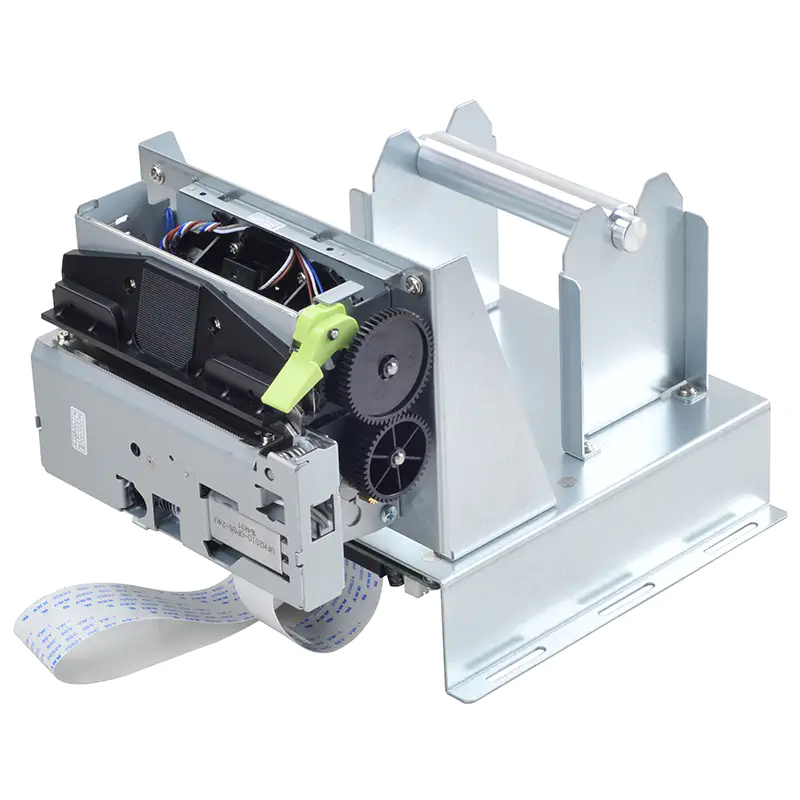
High-volume self-service machines need printing equipment that can operate consistently throughout the day. Applications such as ticketing, retail checkout, parking, food ordering, and transportation may generate hundreds or thousands of printed documents over extended operating periods.
A Thermal Kiosk Printer can be a practical choice for these environments because direct thermal printing provides fast output without ink or toner. However, selecting the right model requires attention to more than maximum printing speed. Print volume, paper capacity, mechanical durability, connectivity, maintenance, and installation requirements all influence long-term performance.
Start With the Expected Print Volume
The first step is to estimate how much the kiosk will print during normal and peak periods.
Consider the number of transactions per hour, average document length, operating hours, and seasonal increases in demand. A printer suitable for occasional use may not provide the same reliability when subjected to continuous printing.
It is also useful to consider peak workloads rather than relying only on average daily usage.
Evaluate Printing Speed
Printing speed can directly influence customer waiting times. A fast mechanism can help kiosks process transactions efficiently when many users are waiting.
However, the printer’s rated speed is only one part of the total transaction cycle. Data processing, paper feeding, printing, cutting, and document collection can all affect the time required to complete a transaction.
Choose a printer that provides sufficient practical speed for the application’s typical document length and workload.
Consider Paper Roll Capacity
Paper replacement can become a significant maintenance task in high-volume environments.
A printer that supports an appropriately sized paper roll can operate for longer periods before requiring manual replenishment. This can reduce service visits and minimize interruptions.
The largest possible roll is not always the best choice, however. Roll diameter must remain compatible with the kiosk’s internal space and printer specifications.
Look at Printhead Durability
The thermal printhead is exposed to repeated heating cycles during printing. In a high-volume application, its durability is an important consideration.
Buyers should review the manufacturer’s specifications regarding expected printhead life and recommended operating conditions. Proper paper selection and routine maintenance can also help protect the printhead.
Assess the Paper Feed Mechanism
A reliable paper feed mechanism is essential when a printer operates frequently.
Motors, rollers, gears, and sensors need to move the paper accurately through the printing path. Feeding problems can result in misprints, jams, wasted media, and customer delays.
For high-volume applications, consistent feeding performance can be just as important as raw printing speed.
Check Automatic Cutter Performance
Many kiosks need to separate receipts, tickets, or other documents automatically. A durable cutter can support repeated operation without requiring users or staff to tear the paper manually.
When evaluating a printer, consider the cutter’s expected operating life and whether its design matches the application’s document type and print frequency.
Review Communication Interfaces
The printer must communicate reliably with the kiosk’s controller or computer.
Depending on the system architecture, interfaces may include USB, serial, Ethernet, or other embedded communication options. Compatibility with the kiosk hardware and software should be confirmed before installation.
Stable communication is particularly important when printers are expected to process frequent transactions without interruption.
Consider Power Requirements
High-volume thermal printing involves repeated operation of the printhead, motor, sensors, and cutter. The kiosk’s power system must therefore provide a stable supply that matches the printer’s requirements.
Designers should verify voltage, current, connector configuration, and power consumption before integrating the printer.
An appropriately designed power system can help prevent unexpected interruptions and support consistent operation.
Examine Environmental Conditions
Not every kiosk operates in a controlled indoor environment. Some may be installed in transportation facilities, parking areas, retail entrances, outdoor service points, or other locations where temperature and humidity can vary.
Check the printer’s specified operating temperature, humidity range, and environmental limitations. The paper should also be suitable for the conditions in which the kiosk will operate.
Plan for Easy Maintenance
Even a durable printer eventually requires maintenance. High-volume systems should therefore be designed for convenient access to consumables and serviceable components.
Useful features can include accessible paper loading, clear sensor feedback, straightforward cleaning procedures, and easy removal of paper jams.
Reducing maintenance time can be particularly valuable when a kiosk is deployed across multiple locations.
Evaluate Paper Compatibility
Thermal paper quality can affect both print performance and component life.
The selected paper should meet the printer’s specifications for width, thickness, thermal sensitivity, roll diameter, and core size. High-quality compatible media can help produce consistent output and reduce feeding issues.
For documents containing barcodes or QR codes, paper quality is especially important because poor contrast or uneven printing can affect scanning reliability.
Consider Print Content
High-volume kiosks may print simple receipts, but some applications require more complex documents.
A ticket might contain:
- Transaction information
- Dates and times
- Barcodes
- QR codes
- Logos
- Pricing details
- Reference numbers
- Instructions
The printer should be capable of producing the required content at an appropriate quality and speed.
Check Software and Firmware Compatibility
Hardware performance depends partly on the software controlling it.
The printer should support the required command language, drivers, or communication protocols used by the kiosk system. Firmware should also provide stable control of printing, paper feeding, sensors, and cutting functions.
Testing compatibility before large-scale deployment can help identify integration problems early.
Test Under Realistic Conditions
Laboratory testing with a few sample receipts may not reveal how a printer behaves during continuous operation.
Before deployment, consider testing the printer using realistic workloads. Simulate peak transaction periods and monitor printing speed, paper feeding, cutter operation, temperature, and error frequency.
Long-duration testing can provide useful information about practical reliability.
Compare Total Operating Cost
Purchase price is only one part of the cost of a high-volume printing system.
Businesses should also consider:
- Thermal paper consumption
- Maintenance requirements
- Replacement components
- Service labor
- Downtime costs
- Expected operating life
- Energy consumption
A printer with a higher initial cost may provide better overall value if it reduces maintenance and service interruptions over its operational lifetime.
Consider Scalability
Large deployments may involve dozens or hundreds of kiosks. In these situations, consistency between units becomes important.
Businesses should consider whether the selected printer can be supplied reliably at the required volume and whether replacement parts and technical support will remain available.
Standardizing on compatible printing mechanisms can also simplify maintenance and staff training across multiple locations.
Create a Selection Checklist
Before making a final decision, compare potential printers against the actual application requirements.
| Factor | What to Evaluate |
|---|---|
| Print volume | Normal and peak daily usage |
| Speed | Practical output time |
| Paper capacity | Roll diameter and replacement frequency |
| Durability | Printhead, feed mechanism, and cutter life |
| Connectivity | Interface and software compatibility |
| Environment | Temperature and humidity limits |
| Maintenance | Access and service requirements |
| Print quality | Text, graphics, barcodes, and QR codes |
| Integration | Physical and software compatibility |
| Total cost | Consumables, maintenance, and downtime |
This approach helps prevent important requirements from being overlooked.
Conclusion
Choosing a thermal kiosk printer for high-volume applications requires a complete evaluation of the printing workflow. Speed matters, but reliability, paper capacity, printhead durability, feeding performance, cutter life, connectivity, environmental tolerance, and maintenance requirements are equally important.
By testing printers under realistic workloads and comparing their total operating costs, businesses can select a solution that is better suited to continuous self-service operation. The right combination of performance and durability can help keep high-traffic kiosks productive while reducing avoidable service interruptions.


