


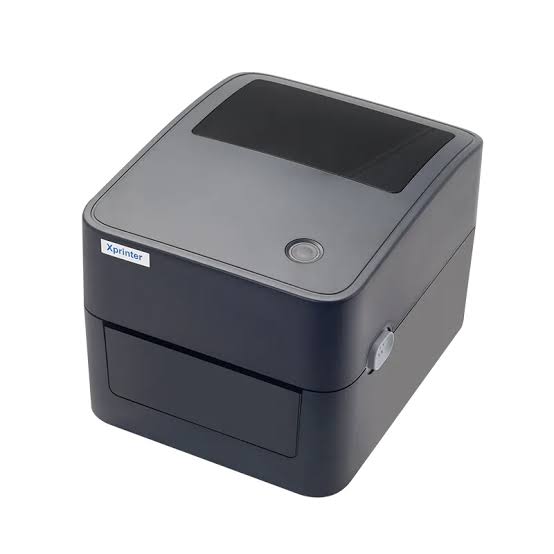
Thermal printing technology has become an important part of modern business operations because of its speed, convenience, and ability to produce clear printed information. From retail receipts and restaurant orders to shipping labels and warehouse barcodes, thermal printers support a wide range of everyday activities. However, not every thermal printer is designed for the same purpose. Different models offer specific features to accommodate different printing requirements.
Understanding the available types of thermal printing equipment can help businesses make better purchasing decisions. An Xprinter Thermal Printer can be evaluated according to its printing method, design, connectivity, and intended application. By understanding these differences, buyers can identify equipment that fits their operational needs and supports consistent printing performance.
What Are Thermal Printers?
Thermal printers are devices that use heat to create text, images, and other information on paper or compatible printing materials. Unlike conventional inkjet and laser printers, they generally do not depend on traditional ink cartridges or toner.
The technology is widely used in environments where businesses need to produce documents quickly and regularly. Thermal printers are particularly common in retail stores, restaurants, transportation services, healthcare facilities, and distribution centers.
There are two primary thermal printing technologies: direct thermal and thermal transfer. In addition to these technologies, printers are available in different physical configurations, such as desktop, mobile, and industrial models.
1. Direct Thermal Printers
<AsyncImage query=”desktop direct thermal receipt printer printing paper receipt” aspectRatio=”16:9″ width=”100%”/>
Direct thermal printers use specially coated paper that reacts to heat. When the printhead applies heat to selected areas, the paper changes color to form text, numbers, graphics, or barcodes.
Because this method does not require ink, toner, or ribbons, direct thermal printing is relatively simple to operate.
Main Features
- Ink-free printing process
- Simple media replacement
- Fast printing performance
- Relatively straightforward maintenance
- Suitable for short-term printed materials
Common Applications
Direct thermal printers are frequently used for retail receipts, restaurant order tickets, delivery labels, queue tickets, and temporary identification labels.
However, their output can become faded when exposed to high temperatures, sunlight, or friction. Therefore, they are generally better suited to applications where printed information does not need to remain readable for many years.
2. Thermal Transfer Printers
<AsyncImage query=”thermal transfer barcode label printer printing product labels ribbon roll” aspectRatio=”16:9″ width=”100%”/>
Thermal transfer printers use a ribbon containing ink that transfers onto a printing surface when heated by the printhead. The ink bonds with the material to create text, graphics, and barcodes.
This process supports printing on different materials, including paper and certain synthetic labels.
Main Features
- Uses thermal transfer ribbons
- Supports different label materials
- Produces durable printed information
- Suitable for detailed product identification
- Available in different commercial and industrial configurations
Common Applications
Thermal transfer technology is commonly used for warehouse labels, product packaging, asset identification, equipment tags, and shipping labels.
It is particularly useful when labels need to withstand handling, storage, or more demanding environmental conditions. The final durability depends on the ribbon, label material, and operating environment.
3. Desktop Thermal Printers
<AsyncImage query=”compact desktop thermal barcode label printer on office desk” aspectRatio=”16:9″ width=”100%”/>
Desktop thermal printers are compact devices designed for small and medium-sized printing workloads. They are commonly installed on office desks, retail counters, packaging stations, and other work surfaces.
These printers are available in both direct thermal and thermal transfer configurations, depending on the model.
Main Features
Desktop printers generally offer:
- Compact construction
- Convenient paper or label loading
- USB and other connectivity options
- Relatively simple installation
- Suitable performance for regular business tasks
Common Applications
Small retailers may use desktop printers for product labels and receipts, while online sellers can use them to generate shipping labels and package identification stickers.
Offices may also use them for document identification, filing labels, and internal inventory management.
Their smaller size makes them useful for businesses that need reliable printing without installing large industrial equipment.
4. Industrial Thermal Printers
<AsyncImage query=”industrial heavy duty thermal barcode label printer warehouse manufacturing” aspectRatio=”16:9″ width=”100%”/>
Industrial thermal printers are designed for businesses with demanding printing requirements. They generally feature stronger construction, larger media capacities, and components intended to support higher printing volumes.
Many industrial models use thermal transfer technology, although direct thermal configurations are also available.
Main Features
- Designed for high-volume printing
- Larger paper and label roll capacity
- Durable construction
- Support for different label materials
- Integration with warehouse and manufacturing systems
Common Applications
Industrial thermal printers are widely used in manufacturing facilities, distribution centers, logistics operations, and large warehouses.
They can produce product identification labels, pallet labels, shipping documents, inventory barcodes, and production tracking information.
For organizations that print hundreds or thousands of labels regularly, industrial equipment can help maintain a consistent workflow.
5. Mobile Thermal Printers
<AsyncImage query=”portable handheld mobile thermal receipt printer bluetooth” aspectRatio=”16:9″ width=”100%”/>
Mobile thermal printers are compact devices designed for printing outside traditional fixed workstations. Many models include rechargeable batteries and wireless connectivity, allowing employees to print information while moving between locations.
Their portability makes them particularly useful for businesses that provide services in the field.
Main Features
- Lightweight and portable construction
- Battery-powered operation
- Wireless connectivity on supported models
- Convenient operation in different locations
- Compact paper or label handling systems
Common Applications
Mobile thermal printers are commonly used by delivery personnel, field service technicians, transportation companies, parking services, and mobile retailers.
For example, delivery employees can print transaction receipts or delivery documentation at the customer’s location. Warehouse workers can also use compatible portable models to print identification labels while moving between storage areas.
6. POS Thermal Receipt Printers
<AsyncImage query=”thermal POS receipt printer retail checkout counter printing receipt” aspectRatio=”16:9″ width=”100%”/>
Point-of-sale (POS) thermal printers are designed specifically for transaction-related printing. They are commonly installed alongside cash registers, payment terminals, and computerized checkout systems.
Most POS receipt printers use direct thermal technology because receipts usually do not require long-term durability.
Main Features
- Fast receipt printing
- Support for common receipt paper widths
- Compatibility with POS systems
- Automatic cutting on selected models
- Different connectivity configurations
Common Applications
POS thermal printers are used in supermarkets, convenience stores, restaurants, cafes, hotels, and other businesses that process customer transactions.
They help produce purchase receipts, payment confirmations, order summaries, and transaction records.
Their speed and straightforward operation make them useful in environments where employees handle frequent customer payments.
7. Barcode and Label Thermal Printers
<AsyncImage query=”thermal barcode label printer printing adhesive barcode labels” aspectRatio=”16:9″ width=”100%”/>
Barcode and label printers are designed to produce adhesive labels containing product details, identification numbers, and machine-readable codes.
Depending on their configuration, these devices may use direct thermal or thermal transfer technology.
Main Features
- Support for different label dimensions
- Barcode and QR code printing capabilities
- Suitable output resolution for identification labels
- Compatibility with label design software
- Support for different media types
Common Applications
These printers are useful in retail, manufacturing, healthcare, warehousing, and logistics.
Retail businesses can generate product price labels, while warehouses use barcode stickers to identify stored goods. Shipping departments also rely on label printers to produce package identification and delivery information.
The ability to print clear, readable barcodes helps improve scanning accuracy and inventory organization.
Comparison of Different Thermal Printer Types
The following table highlights the main differences between common thermal printer categories.
| Printer Type | Main Characteristics | Typical Applications |
|---|---|---|
| Direct thermal | Uses heat-sensitive paper without ribbons | Receipts and temporary labels |
| Thermal transfer | Uses a heated ribbon to transfer ink | Durable product and asset labels |
| Desktop | Compact design for regular workloads | Small businesses and offices |
| Industrial | Designed for demanding printing volumes | Manufacturing and warehousing |
| Mobile | Portable and often battery-powered | Delivery and field operations |
| POS receipt | Designed for transaction documentation | Retail and restaurants |
| Barcode and label | Produces identification labels and barcodes | Inventory and logistics |
These categories are not always mutually exclusive. For example, a desktop printer may also be a direct thermal label printer, while an industrial printer may support both direct thermal and thermal transfer printing.
How to Choose the Right Thermal Printer
Selecting suitable printing equipment requires an understanding of the intended application, daily printing volume, and working environment.
Identify Your Printing Requirements
Start by determining whether the business needs receipts, shipping labels, product stickers, barcodes, or other printed materials.
A restaurant may prioritize fast receipt printing, while a warehouse may require durable labels and high-volume barcode production.
Evaluate Daily Printing Volume
The expected number of printing tasks can help determine the appropriate printer category.
Small businesses with occasional printing requirements may find desktop models sufficient. Organizations with demanding workloads may need industrial equipment designed for continuous commercial use.
Consider Connectivity Options
Connectivity affects how easily a printer integrates with existing business systems.
Common options include:
- USB for direct computer connections
- Ethernet for network-based installations
- Bluetooth for compatible mobile devices
- Wi-Fi for supported wireless network environments
Buyers should verify that the selected interface is compatible with their software and hardware.
Check Media Compatibility
Different printers support different paper widths, label sizes, roll capacities, and printing materials.
Checking these specifications before purchasing helps avoid compatibility issues and ensures that the printer can handle the intended media.
Review Maintenance and Support
Printhead cleaning, roller inspection, and proper media handling are important for maintaining consistent output.
Businesses should also consider product documentation, warranty coverage, replacement parts, and technical support availability.
Benefits of Selecting the Appropriate Thermal Printer
Choosing the correct printer type can improve several aspects of business operations.
Improved productivity: Equipment matched to the workload can reduce printing delays and help employees complete routine tasks faster.
Better output quality: Appropriate resolution and compatible materials support readable text, graphics, and barcodes.
Reduced operating expenses: Direct thermal models eliminate ink and toner requirements, while suitable equipment selection can help prevent unnecessary maintenance costs.
Greater operational flexibility: Desktop, mobile, and industrial configurations support different workplace arrangements.
Simplified documentation: Automated receipt and label printing reduces dependence on handwritten records and repetitive manual processes.
These benefits are most noticeable when the printer is properly integrated into existing business workflows.
Common Factors That Affect Thermal Printer Performance
Even a suitable printer may not deliver consistent results if it is incorrectly configured or poorly maintained.
Several factors can influence printing performance:
- Printhead condition: Dust and residue can affect print clarity.
- Media quality: Incompatible or low-quality paper and labels may cause inconsistent output.
- Software settings: Incorrect paper dimensions and printing configurations can lead to alignment problems.
- Connectivity stability: Unreliable connections may interrupt printing tasks.
- Operating conditions: Excessive heat, dust, and unsuitable storage conditions can affect equipment performance.
Regular maintenance and correct configuration help businesses reduce these problems and maintain reliable printing operations.
Conclusion
Thermal printers are available in different types to accommodate the varied needs of modern businesses. Direct thermal and thermal transfer technologies provide different printing methods, while desktop, industrial, mobile, POS, and label printers serve specific operational purposes.
Understanding these categories makes it easier to compare equipment based on printing volume, media requirements, connectivity, durability, and intended applications. By selecting the right configuration, businesses can improve workflow efficiency, maintain accurate records, and support their daily printing requirements across retail, hospitality, manufacturing, and logistics environments.


