


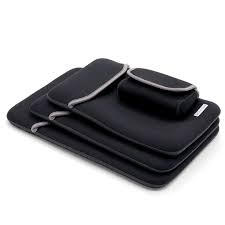
Choosing the right laptop bag is an important decision for anyone who regularly carries a laptop between home, work, school, or other locations. A suitable bag should provide adequate protection, fit the device properly, and offer enough convenience for everyday transportation. With different materials, sizes, and designs available, understanding what to look for can make the selection process easier.
Neoprene has become a popular material for laptop sleeves and carrying cases because of its flexibility, lightweight construction, and cushioning properties. A well-fitted Neoprene Laptop Bag can help protect a device from minor scratches, everyday bumps, and light moisture exposure. However, selecting the right option requires considering several factors, including laptop dimensions, material thickness, storage capacity, and construction quality.
1. Determine Your Laptop’s Exact Dimensions
The first step in choosing a suitable laptop bag is measuring your device correctly. Laptop screen sizes do not always represent the actual external dimensions, as different manufacturers use different bezel designs and body proportions.
Before purchasing a bag, measure the following:
- Width: Measure the laptop from one side to the other.
- Height: Measure the device from its bottom edge to the top.
- Thickness: Check the depth of the laptop, including any raised components.
Compare these measurements with the bag’s internal dimensions rather than relying only on its advertised screen-size compatibility.
A properly sized bag should hold the laptop securely without making insertion or removal difficult.
2. Choose the Appropriate Neoprene Thickness
Neoprene is available in different thicknesses, and this can influence the overall cushioning, flexibility, and weight of a laptop bag.
Thicker neoprene generally provides more cushioning against minor impacts, making it useful for people who frequently carry their devices. Thinner material creates a slimmer profile and is often preferred by individuals who place their laptop sleeves inside backpacks or briefcases.
The ideal thickness depends on how the device will be transported and the level of everyday protection required.
3. Consider the Level of Protection Required
Not every laptop user faces the same transportation conditions. Someone working primarily from home may need basic scratch protection, while a frequent traveler may require additional cushioning.
When evaluating a neoprene bag, consider these protective features:
Cushioning
The soft structure of neoprene helps absorb some minor shocks and reduces direct contact between the laptop and surrounding objects.
Scratch Resistance
A smooth interior surface can help prevent scratches caused by friction during regular transportation.
Moisture Resistance
Neoprene naturally resists some moisture, which can help protect against light splashes. However, zipper openings and seams may still allow water to enter.
Reinforced Edges
Some designs include additional padding around corners and edges. These areas deserve attention because they are often exposed to accidental bumps.
For demanding environments, a dedicated hard-shell case or additional protective padding may be more appropriate.
4. Select a Design That Matches Your Daily Routine
Laptop bags come in different designs, and each serves a slightly different purpose. Understanding your daily transportation habits can help you choose the most practical style.
Sleeve-Style Bags
Sleeve-style designs are compact and lightweight. They are suitable for people who already carry a backpack or briefcase and want an additional protective layer around their laptop.
Zippered Laptop Bags
Zippered designs provide a secure closure and make it easier to insert or remove a device. Some models also include small pockets for accessories.
Laptop Bags with Handles
These designs allow users to carry their laptops independently without needing another bag. They can be convenient for short trips, meetings, and office transportation.
Shoulder-Strap Designs
Bags with shoulder straps offer hands-free carrying convenience. They may be suitable for professionals and students who frequently move between different locations.
5. Evaluate Storage Capacity and Additional Compartments
Laptop users often carry more than just their computers. Chargers, headphones, mice, USB drives, and notebooks may also be part of their everyday equipment.
If you regularly transport these accessories, consider choosing a bag with additional storage compartments.
Useful storage features may include:
- Dedicated charger pockets.
- Small compartments for USB drives and memory cards.
- Pockets for wireless mice and headphones.
- Space for notebooks and essential documents.
- Separate sections for cables and adapters.
However, additional storage should not make the bag unnecessarily bulky. Select a design that accommodates your essential accessories without compromising portability.
6. Check Zipper, Stitching, and Overall Construction
Material quality is important, but the smaller construction details also influence how long a laptop bag remains functional.
Pay particular attention to the following areas:
Zippers: Look for smooth operation and secure closures that do not become stuck easily.
Stitching: Examine seams for consistent stitching and signs of weak construction.
Corners: Check whether the edges are reinforced to withstand regular handling.
Interior lining: A soft lining can provide an additional layer between the laptop surface and the bag.
These details can help identify a well-constructed product that is suitable for frequent everyday use.
7. Consider Weight and Portability
A laptop bag should make transportation easier rather than creating additional inconvenience. This is especially important for students, commuters, and professionals who carry electronic equipment throughout the day.
Neoprene is naturally flexible and relatively lightweight, making it suitable for compact laptop sleeves.
Before selecting a design, consider whether you will carry it independently or place it inside another bag. A slim sleeve may be sufficient for occasional transportation, while a larger design with handles or shoulder straps may be more practical for daily commuting.
8. Choose a Suitable Color and Appearance
Appearance is another consideration when selecting a laptop bag. Professionals may prefer neutral colors and minimal designs that complement formal clothing, while students may choose brighter colors or patterned options.
Neoprene bags are available in different colors and finishes, providing flexibility for different personal preferences.
However, appearance should not be the only deciding factor. Material quality, proper dimensions, and functional construction should remain the main priorities.
9. Understand Cleaning and Maintenance Requirements
Regular cleaning helps keep a laptop bag in good condition, particularly when it is used every day.
Neoprene is relatively easy to maintain. Most minor dirt and surface marks can be cleaned with a soft cloth, mild soap, and water.
Follow these maintenance practices:
- Remove loose dust and debris regularly.
- Use mild cleaning products instead of harsh chemicals.
- Avoid excessive scrubbing that could damage the surface.
- Allow the bag to air-dry completely.
- Keep it away from direct heat sources.
- Inspect the zipper and stitching periodically.
Always follow the manufacturer’s care instructions because cleaning recommendations may differ between products.
10. Match Your Choice to Your Specific Device
Different laptop categories may require different carrying solutions. Considering the type of device you own can help narrow down the available options.
| Laptop Type | Recommended Bag Features |
|---|---|
| Ultrabooks | Slim, lightweight construction |
| Standard business laptops | Comfortable fit and everyday cushioning |
| Gaming laptops | Larger dimensions and additional padding |
| Workstation laptops | Strong construction and sufficient internal space |
| Convertible laptops | Accurate sizing and secure fit |
For larger or heavier devices, checking internal dimensions and overall construction is particularly important.
Common Mistakes to Avoid When Buying a Neoprene Laptop Bag
Even a suitable-looking bag may not meet your needs if important details are overlooked. Avoiding these common mistakes can help prevent unnecessary purchases.
Buying Based Only on Screen Size
Two laptops with the same screen size may have different external dimensions. Always check the actual measurements before purchasing.
Ignoring Material Thickness
A very thin sleeve may not provide the cushioning required for frequent transportation. Consider how and where the laptop will be used.
Overlooking Storage Needs
Choosing a sleeve without considering accessories may create additional carrying problems. Think about the items you regularly transport.
Assuming Every Neoprene Bag Is Waterproof
Neoprene offers some natural water resistance, but the complete bag may not be waterproof. Check the construction and closure system before relying on it in wet conditions.
Prioritizing Appearance Over Functionality
A stylish design is useful, but it should not come at the expense of proper fit, secure stitching, and practical protection.
Conclusion
Choosing the right neoprene laptop bag requires evaluating your device’s dimensions, protection requirements, material thickness, storage needs, and everyday transportation habits. A properly selected bag can provide lightweight cushioning, help reduce scratches, and make carrying a laptop more convenient.
Whether you are a student, business professional, remote worker, or frequent traveler, focusing on fit and construction quality will help you find a suitable option. By comparing different designs and understanding their practical features, you can select a laptop bag that supports your daily activities while helping maintain your device’s condition.


